

Cancel your subscription
How to cancel a trial, a monthly subscription or a committed term, what you still pay, and what happens on your last day.
You can cancel Footer365 from the portal at any time. The page tells you your last day of service before you confirm, so there are no surprises. This article explains the options and what happens at the end.
The full terms are in the Footer365 cancellation and refund policy, linked from the top of the Cancel subscription page.
Who can cancel
Only a Super Admin can cancel, because it ends the contract for your whole organisation. The Cancel subscription page is under Account in the sidebar.
If you buy through a reseller, you cancel through them. The page says Billed through your reseller, names your reseller and shows their contact details: their billing contact where they have given one, otherwise their support or main contact, and the page says which. Your reseller confirms the notice and last day that apply to you.
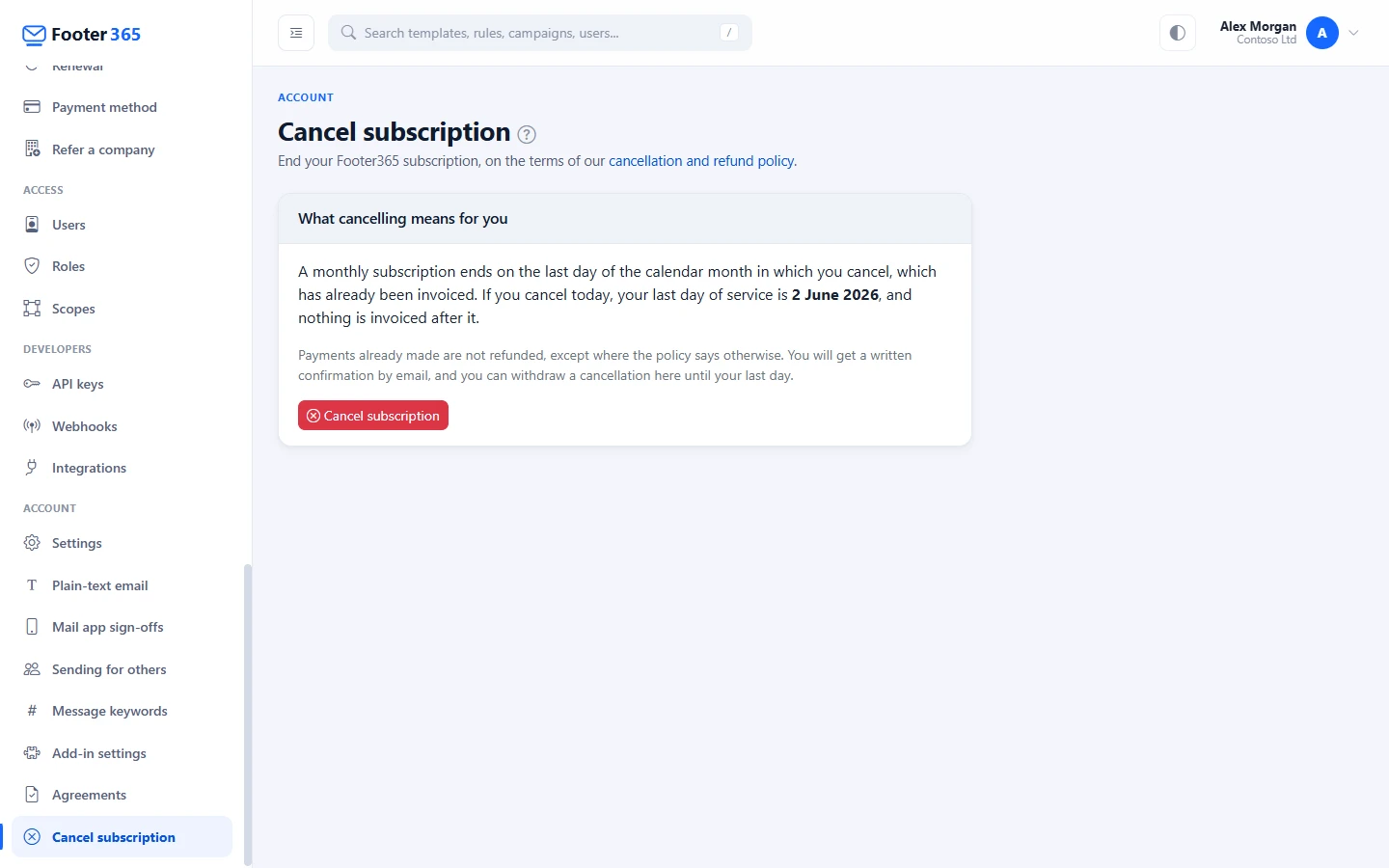
Cancel
- Go to Account > Cancel subscription (open it).
- Read What cancelling means for you. It shows your last day of service.
- If you are part-way through a committed term, choose how to settle it (see below).
- Select Cancel subscription.
- In the Cancel your subscription? window, check the date and select Cancel subscription again. Select Keep my subscription if you change your mind.
A written confirmation is emailed to your billing contact, giving your last day of service.
What you pay depends on your subscription
During the free trial
The trial ends today and nothing is due. The same applies if your trial has ended and you have not added a card, or if Microsoft 365 has not been connected yet. Footer365 takes itself out of your Exchange Online straight away, as described under "What happens on your last day" below.
This is so even if you have claimed the switching offer: the claim lapses and nothing is charged.
When a switching offer claim is decided late
If you claimed the switching offer, Footer365 decides your claim within 7 days of the day you made it. If it has not, and your trial has ended, What cancelling means for you says so, and until the claim is decided you may cancel this way (Customer Agreement 6.8 (e)). You choose your Last day of service: today, or a later day of this month, which is already invoiced. Your committed term is cancelled, and no fees are payable for the rest of it. You pay what a monthly subscription would have cost: the monthly price for your seats for every day from the day after your trial ended to your last day, each day at the monthly price divided by the days in its month, less the fees invoiced, or to be invoiced, for those days after any credit. The page shows what leaving costs before you confirm: the monthly price for those days, what was invoiced for them, and the difference. It is invoiced when you cancel, due within 14 days, and charged to your card.
Such a cancellation cannot be withdrawn in the portal, because it has already been charged. Contact Footer365 support instead. You can instead withdraw the claim and keep your subscription, as The switching offer describes.
Once your trial has ended with your claim approved, you cancel as for any committed term, below.
Monthly subscription
A monthly subscription can be cancelled at any time with no notice period, and ends on the last day of the calendar month in which you cancel. That month has already been invoiced, and nothing is invoiced after it. For example, if you cancel on 10 November, your last day is 30 November.
What cancelling means for you shows your last day before you confirm.
If Footer365 has published a price rise and you cancel before it takes effect, the rise is not charged before your subscription ends: you pay the lower of the old and new price until your last day. See "When Footer365's prices change" in Invoices and VAT.
Committed term (for example 12 months)
A committed term is priced lower because you commit to the whole term, so the fees for the rest of the term are still payable. You choose one of two options:
- Keep the service to the end of the term: signatures keep running and you are invoiced monthly as now until the term ends. Switching offer credits still to come are given on those invoices as usual. If the term ends part-way through a month, that month is charged only for the whole days before it ends. This is selected unless you choose otherwise.
- Pay the rest of the term now: one invoice for all the remaining months, with a final part-month charged only for its whole days, for the seats you committed to at your term rate plus VAT (user mailboxes above your committed seats are not charged for the months ahead), charged to your card straight away. If your switching offer has credits still to come, they are taken off this invoice, each as a Switching Offer Discount line for one month's plan charge. The page shows the exact amount before you confirm. No further invoices are raised and the service stays available until the end of the term.
If paying now is not possible for your account, the page explains why and only the first option is offered.
If you only want to stop the term renewing, cancelling during the term does that, and the term runs to its end. To renew on different terms instead, such as a shorter term or monthly, see Renewing a committed term.
Payments already made are not refunded, except where the policy says otherwise.
Customers in the European Union switching provider
If your organisation is established in the European Union and is switching to another provider under the EU Data Act, you can leave a committed term early on two months' notice (Customer Agreement 6.7). Contact Footer365 support to give notice; it is recorded by Footer365 rather than in the portal. There is no charge for the switch itself. The only fee is the term discount you have used: the difference between the monthly price and your term price for the months of the term you have used, together with every switching offer credit you were given up to your last day. It is never more than the fees for the rest of the term would have been. If you buy through a reseller, the fee is charged to your reseller.
Until your last day, Account > Cancel subscription shows Cancellation requested, saying you are leaving your committed term early under the EU Data Act. Footer365 helps you take your data with you, as described under "What happens on your last day" below.
When Footer365 releases you without charge
In some cases the agreement says no fees are payable for the rest of your subscription, including the rest of a committed term: for example when signatures fail for longer than the agreement allows (Customer Agreement 4.6), when Footer365 agrees with your objection to a change or an expert decides it in your favour (19.3), or when you object to a new sub-processor (Data Processing Terms 5.2). Footer365 then releases you from the subscription:
- Your subscription ends after a last day of service Footer365 gives you. For an objection to a change, that is the day before the change took effect, which may already have passed.
- Nothing is payable for any day after it. Anything you paid for those days is refunded, to the card that paid it where you paid by card, and an unpaid invoice for them is cancelled. Each comes with a credit note, listed with your invoices. See "Credit notes and refunds" in Invoices and VAT.
- Your account owner and billing contact are emailed the clause it was made under, your last day of service and what happens to the money.
- If you buy through a reseller, Footer365 stops charging your reseller for you from that day and refunds it for the days after. What you paid your reseller is between you and your reseller.
Until your last day, Account > Cancel subscription shows Cancellation requested, saying Footer365 released your subscription without charge. A release cannot be withdrawn in the portal. Your last day then goes as described under "What happens on your last day" below.
If Footer365 ends your subscription for a breach
If your organisation commits a material breach of the Customer Agreement, Footer365 first gives you notice of it. If it is not remedied within 30 days of that notice, Footer365 may end your subscription (Customer Agreement 16.3). It then ends at once:
- Your account owner and billing contact are emailed the breach, the day notice was given and what is still payable.
- Part-way through a committed term, the rest of the term is due at once (Customer Agreement 16.5): it is invoiced in one go and, if a card is on file, charged to it.
- If your switching offer has credits still to come, the rest of the term is reduced by them (Customer Agreement 6.8 (f)).
- Signatures stop, and Footer365 takes itself out of your Exchange Online as described under "What happens on your last day" below. You can export your data for 30 days.
If you buy through a reseller, the same notice and 30 days apply, and the subscription ends the same way, but Footer365 does not invoice you. Part-way through a committed term, your reseller is charged the rest of the term instead: each remaining month stays on your reseller's monthly invoice from Footer365 until the term ends, and your reseller is told. The email to you says you owe Footer365 nothing. Anything you owe your reseller is between you and your reseller.
If your organisation enters administration or liquidation
If you buy direct, see "If your organisation enters an insolvency procedure" in Missed payments.
If you buy through a reseller, your reseller deals with your insolvency practitioner. Once Footer365 has confirmed that your organisation has entered administration or liquidation, your reseller may end your subscription straight away, whatever is left of a committed term. Signatures then stop, and Footer365 takes itself out of your Exchange Online as described under "What happens on your last day" below. You can export your data for 30 days, and your reseller can delete your account only after that.
Changed your mind?
Until your last day, you can go back to Account > Cancel subscription, where the page shows Cancellation requested, and select Withdraw cancellation and carry on. Your subscription continues as before and you get an email to confirm. If a price rise took effect while you were under notice, you pay the new price from your next invoice. Likewise, if a change to the agreements took effect while you were under notice, your organisation is treated as accepting it when you withdraw. See Your agreements and how changes to them work.
If you chose to pay the rest of a committed term now, the cancellation cannot be withdrawn in the portal. Contact Footer365 support instead.
What happens on your last day
Signatures keep running until the end of your last day of service. After that:
- Your users' own Outlook signatures are switched back on.
- Footer365 removes its transport rules, then its connectors, from your Exchange Online, so your email flows exactly as it did before Footer365. Each step is checked with Microsoft 365 and recorded in your audit log, and any step Microsoft 365 does not confirm is tried again every day until it does.
- Footer365 stops reading your Microsoft 365 directory.
- No further invoices are raised.
- Your account owner and technical contact get an email listing each step and whether it was confirmed.
If your organisation uses the Outlook add-in only, Footer365 has nothing in your Exchange Online to remove, so the first two steps have nothing to do, and the Outlook add-in stops adding signatures. Footer365 leaves people's own Outlook signatures as they are: if you turned them off yourself, Using the Outlook add-in only shows how to turn them back on.
If Footer365's access to your tenant has already been removed, it cannot make these changes. The email then says so and lists what to remove by hand. See Removing Footer365.
After that, signing in to the portal opens the Cancel subscription page, headed Your subscription has ended. It shows Export your data until, the end of the 30 days in which you can still take a copy of your data, and Account and data deleted on, the date within a further 30 days on which your account and its data are deleted. It also shows whether the removal from Exchange Online is done, still in progress, or needs you. With the Outlook add-in only, it shows it as done, with nothing to remove.
Until the export date, the page lists under Export your data what you can download, and those pages stay open to you, for reading and downloading only:
- the signature backup, with your templates, rules and campaigns (Back up and restore your signatures);
- the processing log, and each campaign's clicks from its report (Analytics and signature coverage);
- the audit log, as a CSV file (The audit log);
- your staff directory details;
- your invoices.
After the export date only the Cancel subscription page opens.
Ask for a full copy of your data
If you want everything Footer365 holds for your organisation in one file, rather than export by export, email [email protected] within the 30 days, or at any time while your subscription runs. Footer365 prepares it within 30 days of your request, at no charge, and usually the same day.
The link to it can go only to a Super Admin in your portal or to your account owner, accounts or technical contact, so say which of them should receive it. That person is emailed a link that works once, for 7 days. It opens a page headed with your organisation's name and a Download button, with no sign-in needed. The file is deleted once it has been downloaded or the link has expired.
The file is a zip holding one CSV file for each kind of record, which opens in Excel, each version of each signature template as an HTML file, each invoice Footer365 issued you as a PDF, the images you uploaded, and a README.txt describing each file. It leaves out sign-in secrets, and Footer365's own audit and security records. Invoices raised by a reseller are with your reseller.
Delete your account sooner
You do not have to wait for the deletion date. Once your subscription has ended, a Super Admin can select Delete our account and data now on the Cancel subscription page, type your organisation's name to confirm, and the account and its data are deleted within a few minutes. This works during the export period too, so take any exports you want first. It cannot be undone, and the account cannot come back afterwards.
Only your own Super Admin can do this. Someone working in your portal on your behalf, such as your reseller, cannot. If you would like Footer365 to do it for you, ask Footer365 support, who record who asked and when.
Invoices, and the record of what you agreed to, are kept for as long as the law requires and then deleted. Data and privacy lists everything that is kept, and for how long.
To remove Footer365's access to Microsoft 365 completely, also remove Footer365 from Enterprise applications in Microsoft Entra. Footer365 cannot do that for you. Do it only once the page shows the removal as done.
Coming back
Until the date shown under Account and data deleted on, your account can come back with everything in it: your templates, rules, campaigns and directory. Coming back is a new subscription with no second free trial, and you accept the agreements again. You can come back:
- Directly with Footer365. A Global Administrator signs up again on the Footer365 website. The signup page recognises your organisation and starts with Welcome back. Any unpaid Footer365 invoices must be settled with Footer365 support first. See Signing up.
- Through a reseller, the one you had before or a different one. The reseller adds you as a customer, and your technical contact is emailed a link to the setup wizard. A Global Administrator accepts the agreements there within 7 days, or by the deletion date if that is sooner. Until then nothing changes, and the reseller has no access to your account's data. The Cancel subscription page shows that a reseller has proposed to bring you back.
Either way, Footer365 removed its connectors when the subscription ended, so mail flow is set up again in the setup wizard. Signatures start once it is done. If your organisation used the Outlook add-in only, there was nothing to remove and nothing in Exchange Online to set up again. Your deletion date never moves: if nobody accepts before it, the account is deleted as planned.
Good to know
- Before you go, you may want to keep a copy of your signature designs. See Backup and restore.
- Cancelling is recorded in the audit log, if your account has one.
Related articles
Still stuck?
Tell us what you were trying to do and what you saw. Include the sender, a recipient and roughly when a message was sent, and we can trace it.